How to use a decentralized trading platform: beginner's guide (2026)
Learn how to use a decentralized trading platform in 2026.
Introduction
Most people have heard the term "decentralized." Fewer actually understand what it means in the context of trading, why it matters, and how to use a decentralized platform from start to finish. That's exactly what this guide is for.
If you've been trading on Robinhood, eToro, or any traditional brokerage, you already understand the basics of buying and selling assets. What you may not have experienced yet is what it feels like to trade with no company holding your funds, no business hours limiting your access, no KYC forms, no approval processes, and no artificial barriers between you and the markets you want to trade.
That's what a decentralized trading platform gives you.
This guide walks through everything: what decentralized trading actually means, how it differs from centralized platforms, what Web3 wallets are and how to use them, how smart contract trading works, how to get started on Markets.xyz step by step, and how to navigate the platform with confidence as a first-time user.
By the end, you'll have everything you need to place your first trade on a fully decentralized 24/7 platform.
What is decentralized trading?
Decentralized trading means buying and selling financial assets through smart contracts on a blockchain, rather than through a centralized company that acts as a middleman between you and the market.
In traditional finance and on centralized exchanges, a company sits at the center of every transaction. When you deposit money on eToro, Coinbase, or Robinhood, that company holds your funds, processes your trades, and controls your access to the platform. They can freeze your account, require documentation, restrict withdrawals, and go offline during periods of high volatility. You are trusting them with your capital at every step.
On a decentralized platform like Markets.xyz, none of that exists. Trades are executed by smart contracts, which are self-executing programs on the Hyperliquid blockchain. No company processes your trade. No company holds your money. The rules of the platform are encoded in the contract and execute automatically, transparently, and without the need for human approval.
The core principle: self-custody
The foundational concept of decentralized trading is self-custody. Your funds live in a wallet that only you control. You connect that wallet to a decentralized platform, trade through smart contracts, and disconnect when you're done. The platform never takes possession of your assets. This is the opposite of how every traditional brokerage works.
Self-custody means no counterparty risk from the platform. If Markets.xyz were to shut down tomorrow, your funds would still be in your wallet, completely intact. That is a statement no centralized exchange can honestly make.
Centralized vs. decentralized platforms: the real difference
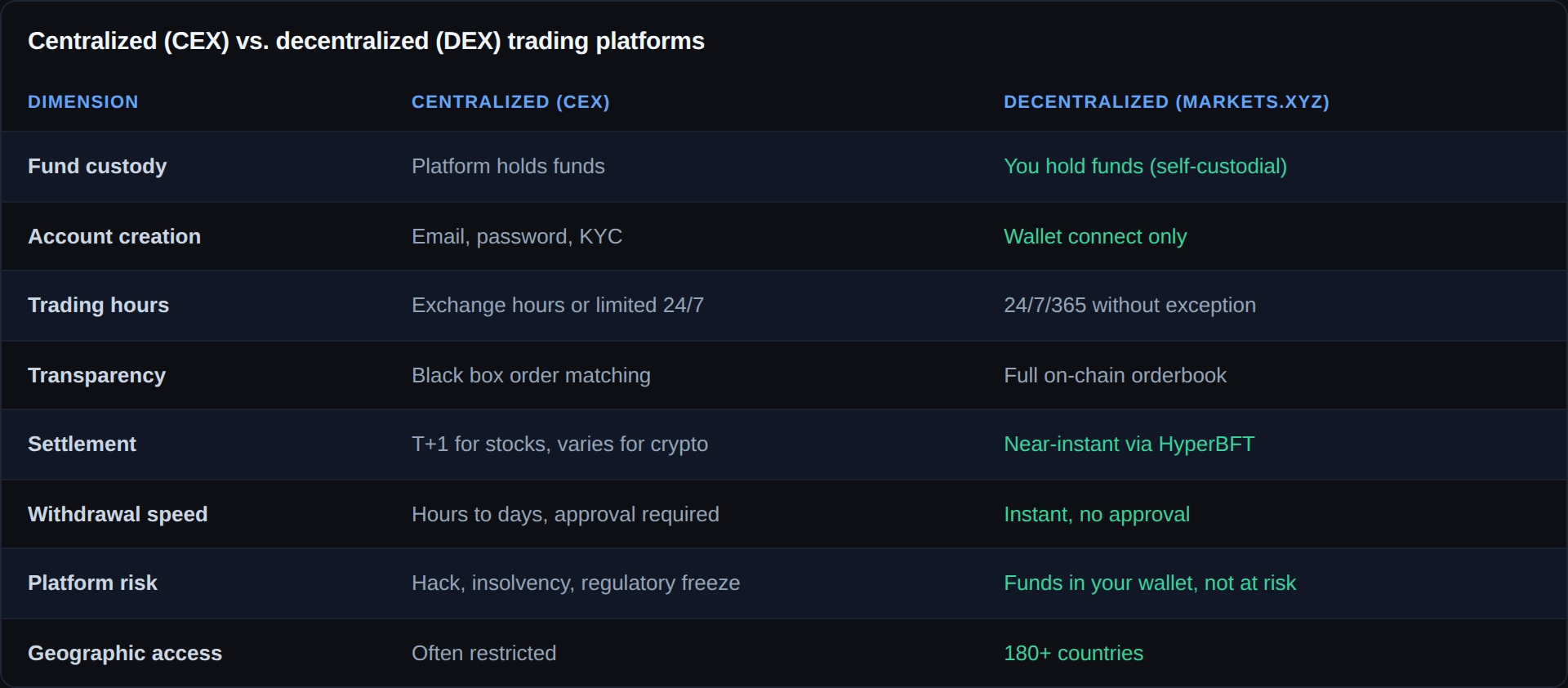
The best way to understand decentralized trading is to compare it directly with what most traders already know.
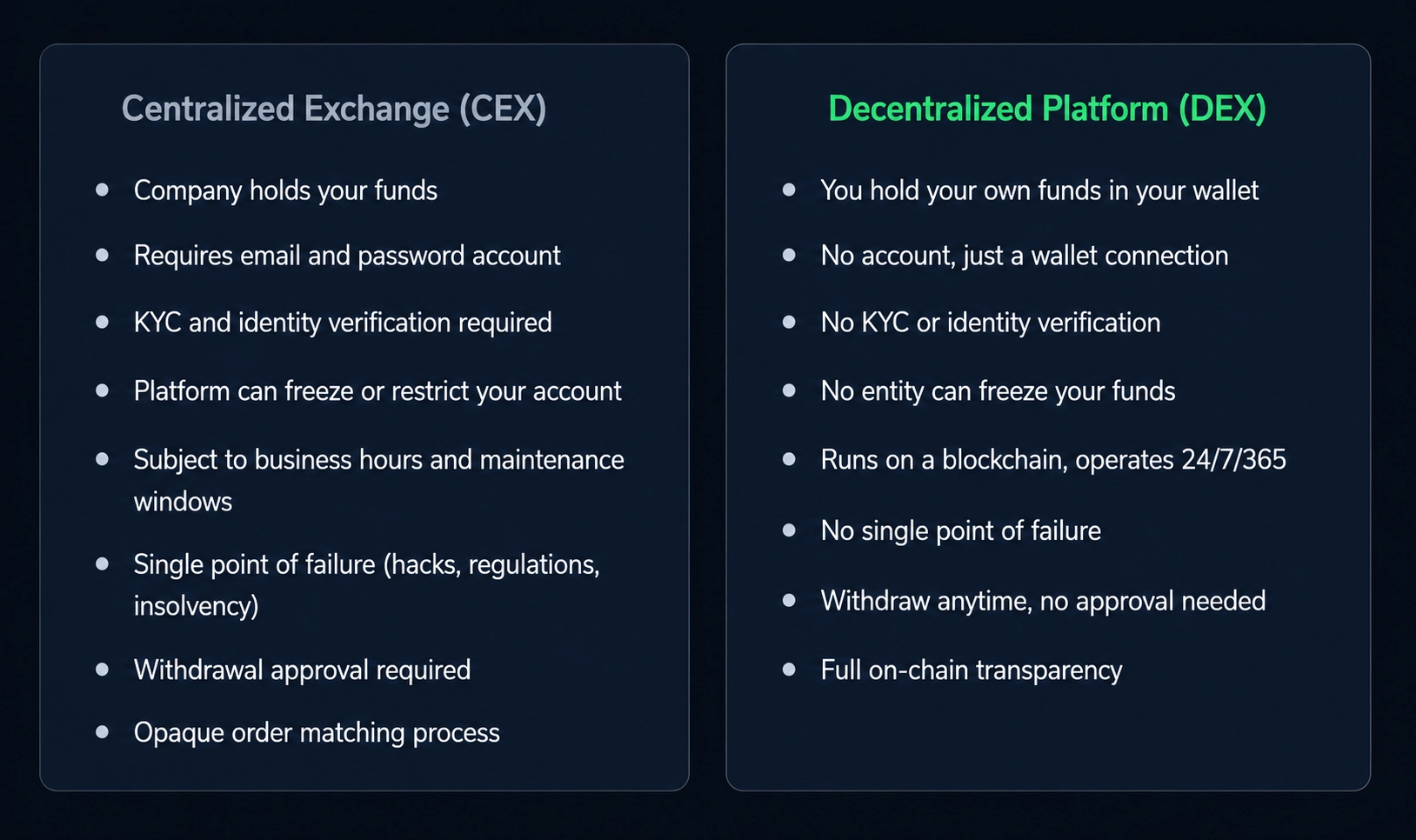
The trade-off is real and worth stating honestly: centralized platforms often offer regulatory protections, fund insurance, and a simpler onboarding experience for complete beginners. Decentralized platforms put full responsibility in your hands. If you lose your wallet's seed phrase, no one can recover your funds. But for traders who understand self-custody and value genuine control over their capital, the decentralized model is a significant upgrade.
What is a Web3 wallet and why do you need one?
A Web3 wallet is a software application that holds your private keys and allows you to interact with blockchain-based applications. Think of it as the decentralized equivalent of your bank account, except no bank controls it, no one can freeze it, and you are the only entity that can authorize transactions from it.
Your wallet does not actually "store" your crypto or funds the way a bank account stores dollars. What it stores is your private key, which is cryptographic proof of ownership over the assets recorded on the blockchain. When you connect your wallet to Markets.xyz and place a trade, you are signing a blockchain transaction with your private key, authorizing the smart contract to execute on your behalf.
The seed phrase: the most important thing you will ever write down
When you create a Web3 wallet, you are given a seed phrase: a sequence of 12 or 24 random words that is the master key to your wallet and everything in it. Whoever has these words has access to your funds. There is no "forgot my password" button. There is no customer support that can recover your account.
Seed phrase security rules: Write your seed phrase on paper and store it somewhere physically secure, never digitally (no photos, no notes apps, no email, no cloud storage). Never share it with anyone for any reason. No legitimate platform, support team, or representative will ever ask for it. If someone asks for your seed phrase, they are attempting to steal your funds.
Which wallet should you use?
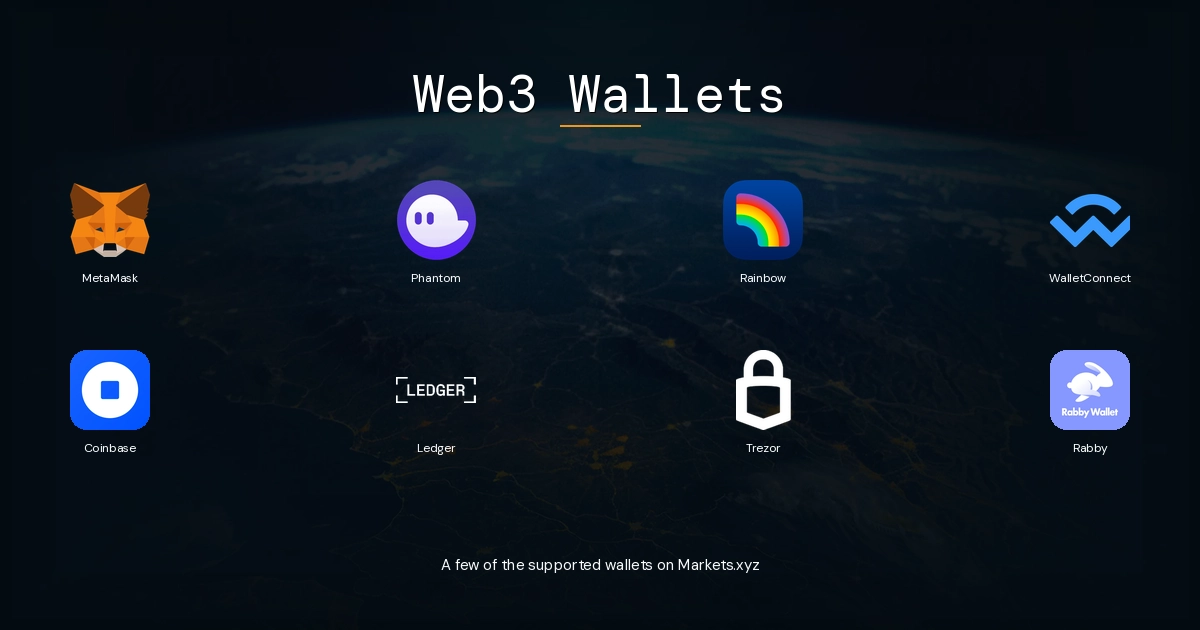
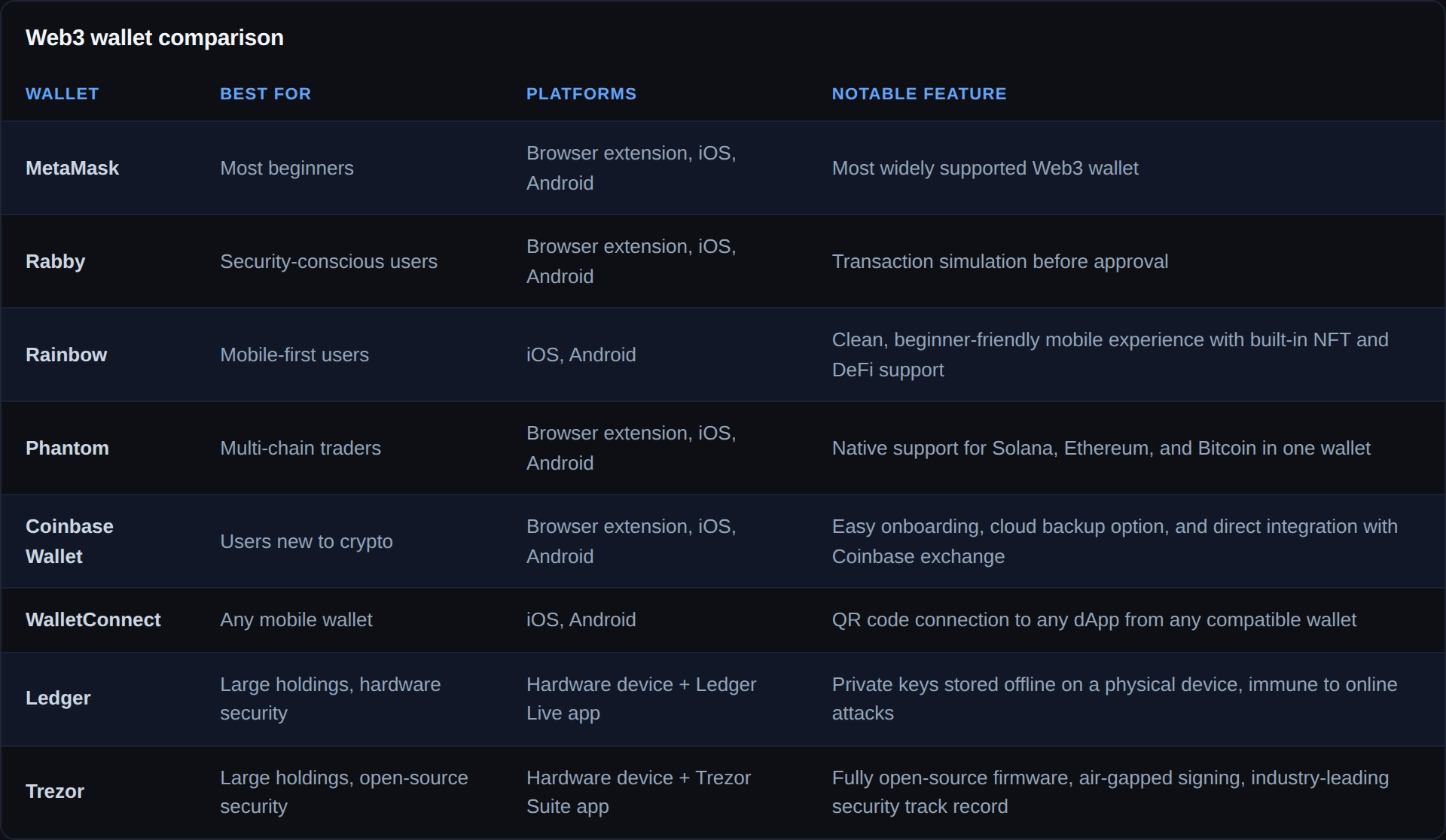
Markets.xyz is compatible with MetaMask, Rabby, and any Web3 wallet that supports the Hyperliquid ecosystem. For most beginners, MetaMask is the most widely used starting point. It's available as a browser extension for Chrome and Firefox, and as a mobile app for iOS and Android. Rabby is a popular alternative with a cleaner interface and built-in transaction simulation that shows you exactly what a transaction will do before you approve it.
How smart contract trading works
A smart contract is a self-executing program stored on a blockchain. It runs automatically when predefined conditions are met, without any human intervention or approval process. Think of it as a vending machine: you put in the correct input, the contract executes the correct output. No one needs to approve the transaction. No one can stop it.
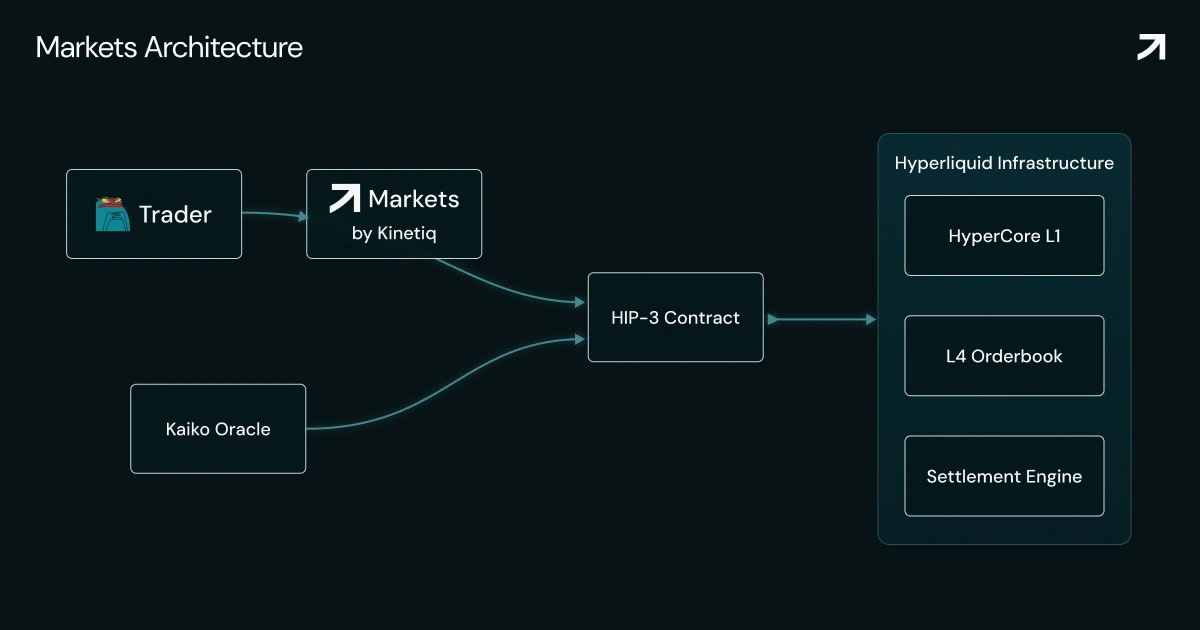
When you trade on Markets.xyz, here is what actually happens at the infrastructure level:
• You connect your wallet and configure a trade in the platform interface
• You sign the transaction with your private key, authorizing the smart contract to act on your behalf
• The transaction is submitted to Hyperliquid's L1 blockchain
• Hyperliquid's HyperBFT consensus mechanism processes the transaction with near-instant finality
• The smart contract executes your order against the on-chain orderbook
• Your position and margin are recorded transparently on-chain
• Your unrealized PnL updates in real time as the oracle price moves
The entire process from signing to execution takes seconds. There is no "pending" state where a centralized server processes your trade. There is no counterparty who could choose not to execute. The contract runs as written, every time, for every user.
How prices are determined: the Kaiko oracle
On a decentralized platform trading traditional assets like stocks and commodities, an important question arises: where does the price come from if the platform isn't connected to a traditional exchange?
Markets.xyz uses Kaiko as its oracle provider. Kaiko is the same institutional-grade pricing infrastructure that powers CBOE and Bitstamp by Robinhood. It provides real-time, manipulation-resistant price feeds sourced from multiple licensed market data providers. The oracle price is used to calculate funding rates, mark prices for PnL and liquidation purposes, and to keep the perpetual contract anchored to the real-world price of the underlying asset.
During regular US exchange hours (9:30 AM to 4:00 PM ET), oracle prices come directly from NYSE and NASDAQ data. During extended hours and weekends, the system uses licensed ATS liquidity sources combined with an internal pricing mechanism that uses an exponentially weighted moving average to ensure fair and manipulation-resistant pricing at all hours. This is how Markets.xyz can offer legitimate price exposure to TSLA or NVDA at 2 AM on a Sunday.
Why this matters: The Kaiko oracle is the same pricing infrastructure used by institutional-grade platforms. You are not trading on a made-up price. You are trading on the same data backbone that powers major financial infrastructure, available 24/7 through a decentralized venue.
Markets.xyz platform tour: what you'll see and how it works
Before you place your first trade, it helps to understand what each part of the Markets.xyz interface does. Here's a guided walkthrough of the key components.
The asset list
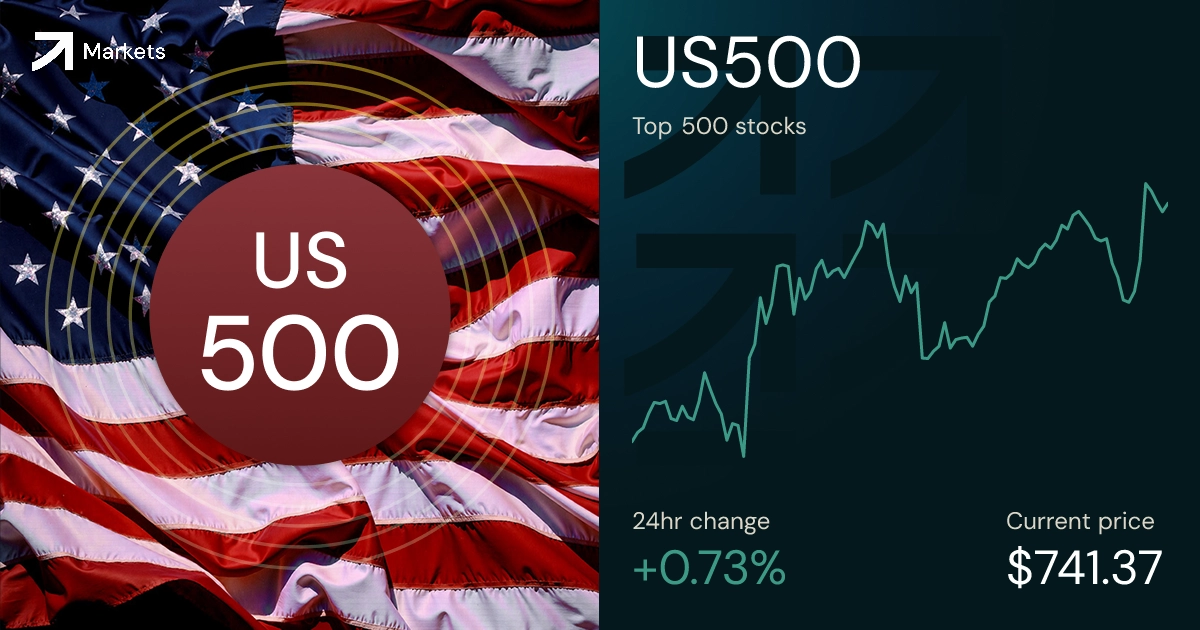
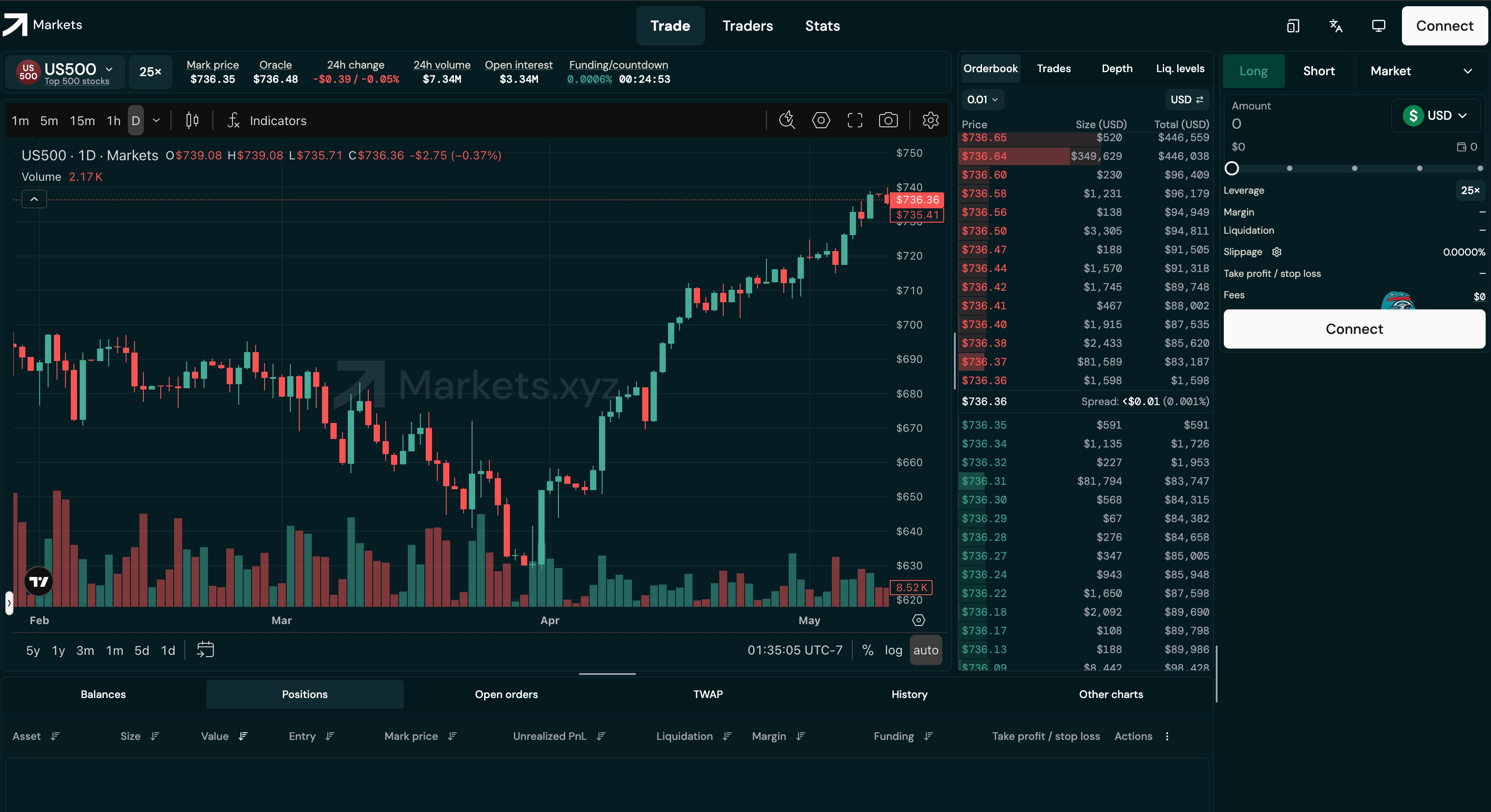
The left panel shows all available markets organized by category: equities, indices, commodities, FX, and crypto. Each market shows the current price, 24-hour change, and funding rate. This is your starting point for selecting what to trade. You can sort by asset class or search by ticker.
The price chart
The main center panel displays the real-time price chart for the selected market, powered by the Kaiko oracle. You can switch between timeframes (1-minute, 5-minute, 15-minute, 1-hour, 4-hour, daily) and apply technical indicators. This is where you conduct your analysis before placing a trade.
The L4 orderbook
Markets.xyz's L4 orderbook is one of the most powerful features available to retail traders on any platform. Unlike traditional aggregated orderbooks that only show combined volume at each price level, the L4 orderbook shows individual orders, each participant's queue position, and liquidity attribution. This gives you the same information transparency previously reserved for institutional trading desks.
The trade panel
The right panel is where you configure and place trades. You'll find the Long and Short buttons, order type selector (Market, Limit, Stop, TWAP, Scale), position size input in USDH, leverage slider, and the calculated liquidation price, margin requirement, and estimated fee. Everything you need to know about a trade is shown before you confirm it.
The portfolio panel
Once you have open positions, the portfolio panel shows your real-time unrealized PnL, margin usage, current leverage, funding payments received or paid, and your liquidation price for each position. This is your risk management dashboard and should be monitored regularly whenever you have active leveraged positions.
The stats page
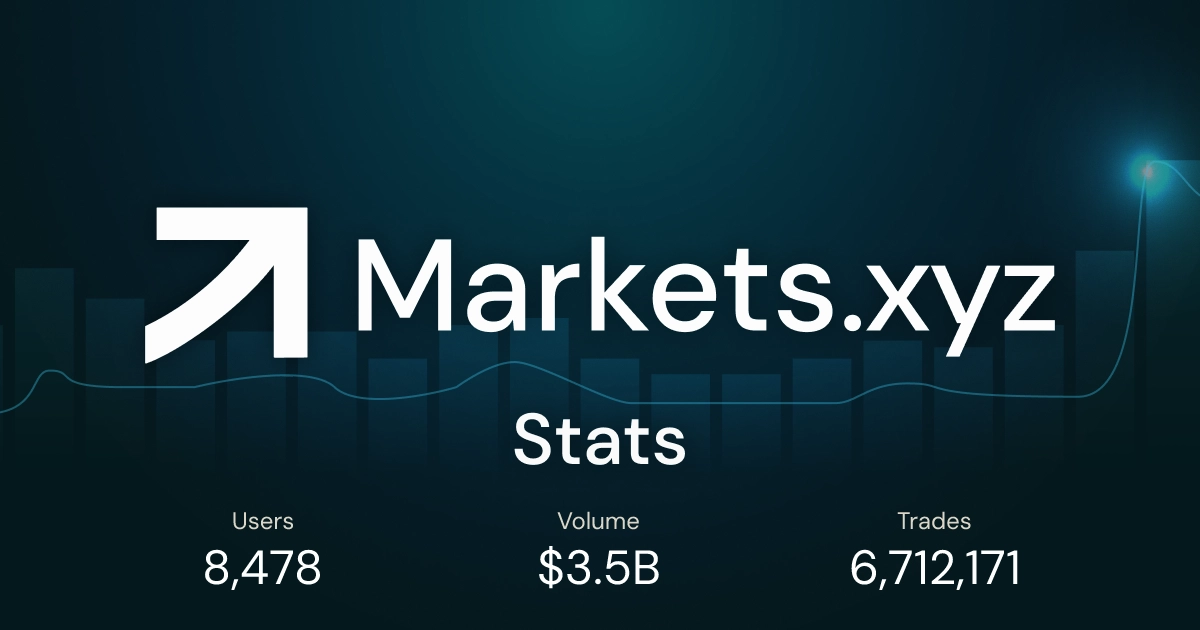
The Stats page at markets.xyz/stats gives you a real-time view of total platform trading volume, open interest across all markets, and top trader activity. This is useful for gauging overall market activity and understanding which markets are attracting the most liquidity at any given time.
How to get started on Markets.xyz: step-by-step
Here is the complete process from zero to your first live trade, broken down into every step you need to take.
Download and set up a Web3 wallet
Go to metamask.io or rabby.io and download the browser extension or mobile app. During setup, you will be given a 12 or 24 word seed phrase. Write it down on paper immediately and store it somewhere physically secure. Do not take a screenshot. Do not save it to the cloud. Once your wallet is created, you'll have a wallet address, which looks like a string of letters and numbers starting with 0x. This address is your identity on Markets.xyz.
Fund your wallet with USDH
All positions on Markets.xyz are margined in USDH, a stablecoin pegged to the US dollar. To fund your wallet, you'll need to acquire USDH and transfer it to your wallet address. You can bridge from other chains or acquire USDH through supported on-ramp methods. The minimum order size on the platform is 10 USDH, so even a small initial deposit is enough to get started and learn the platform before scaling up.
Start small: Your first deposit should be an amount you are comfortable losing entirely while you learn the platform. Treat your initial capital as the cost of education, not a profit-generating position. Once you understand how the interface works and have placed a few trades, you can scale up with confidence.
Connect your wallet to Markets.xyz
Navigate to markets.xyz and click the Connect button in the top right corner. Select your wallet from the list (MetaMask, Rabby, or WalletConnect). Your wallet will prompt you to approve the connection. This is not a transaction and does not cost any gas. It simply gives Markets.xyz permission to read your wallet address and request transaction signatures. Once connected, your wallet address is displayed in the header and you have full access to the platform.
Deposit funds to the platform
Once connected, click Deposit and transfer USDH from your wallet to the trading contract. This is an on-chain transaction that will require your wallet's approval. A small network fee applies to this deposit (bridge gas on the source chain). Once the transaction confirms, your USDH balance will appear in the platform and you are ready to trade. The confirmation typically takes seconds on Hyperliquid's network.
Explore the interface before trading
Before placing any live trade, spend 15 to 20 minutes familiarizing yourself with the platform. Browse the asset list. Switch between markets. Look at the orderbook. Review the trade panel. Understand where the liquidation price is displayed and how it changes as you adjust leverage. Read the funding rate for the market you're interested in. Know what you're doing before you commit capital.
Place your first trade
Select your market from the asset list. Choose Long if you expect the price to rise, or Short if you expect it to fall. Select your order type: Market for immediate execution at the current price, or Limit to set a specific entry price. Enter your position size in USDH. Adjust the leverage slider (start with 1x or 2x for your first trade). Review the calculated liquidation price, margin requirement, and fee. Set a stop-loss before confirming. Click Confirm, approve the transaction in your wallet, and your position is live.
Monitor and close your position
Your open position appears in the portfolio panel with real-time PnL, margin usage, and liquidation price. Monitor these while your trade is active. When you're ready to close, click the Close button on your position and confirm the transaction in your wallet. Your USDH balance will update immediately to reflect the realized profit or loss. You can then withdraw back to your wallet at any time by clicking Withdraw.
Ready to place your first decentralized trade? Connect your wallet, fund with USDH, and start trading in minutes. No KYC, no waiting, no middleman. Start trading on markets.xyz.
Order types on Markets.xyz: a complete guide
Markets.xyz offers a professional-grade suite of order types that go significantly beyond what most retail platforms provide. Understanding each one gives you precise control over how and when your trades execute.
Market order
Executes immediately at the best available price in the orderbook. Use this when you want to enter or exit a position right now and are not concerned about the exact price. The advantage is guaranteed execution. The trade-off is that in a thin orderbook, you may experience slippage, where the execution price differs slightly from the displayed price.
Limit order
Executes only when the market reaches your specified price. Use this when you have a clear entry target and are willing to wait for the price to come to you. Limit orders are the core tool of disciplined traders. They also qualify for maker rebates on Markets.xyz rather than paying taker fees, making them cheaper to execute when they fill.
Stop order
Triggers a market order when the price reaches your specified stop level. This is the mechanism behind stop-loss orders. When you set a stop at a price below your long entry, the platform automatically closes your position if price falls to that level, limiting your loss. Stop orders are essential risk management tools that every leveraged trader should use on every trade.
TWAP order (time-weighted average price)
Breaks a large order into smaller pieces executed at regular time intervals over a specified period. This is an institutional-grade tool for entering or exiting large positions without creating significant market impact. Instead of dumping a large buy order into the market at once and pushing the price against yourself, TWAP distributes your order over time to achieve a better average fill price.
Scale order
Automatically distributes a position across a range of price levels. For example, if you want to buy $10,000 worth of BTC perps between $60,000 and $58,000, a Scale order will automatically place proportional buy orders across that entire range. This is the platform's built-in dollar-cost averaging tool for traders who want to build or exit positions gradually across a price range rather than at a single point.
Leverage and margin: what every beginner needs to know
Leverage is one of the most powerful and most misunderstood features of decentralized trading platforms. Here is a clear, honest explanation of how it works on Markets.xyz.
What leverage actually does
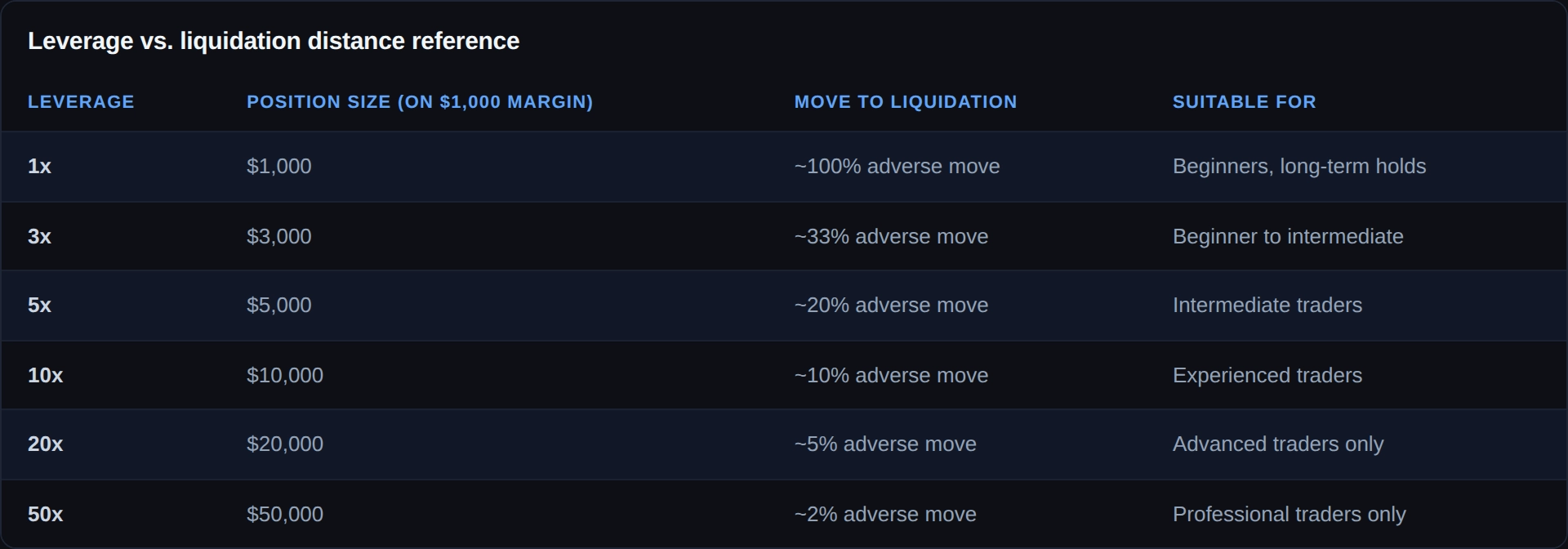
Leverage multiplies your market exposure relative to your deposited capital. At 10x leverage, a $1,000 USDH deposit controls a $10,000 position. A 5% move in your favor generates a $500 profit (50% return on your $1,000 margin). A 5% move against you generates a $500 loss, wiping out half your margin. A 10% move against you at 10x leverage wipes out your entire margin and triggers liquidation.
Markets.xyz offers up to 50x leverage on select markets. This does not mean you should use 50x leverage. It means the platform gives you maximum flexibility. For beginners, 1x to 3x is a reasonable starting range while you learn how perpetual trading works.
Isolated margin
Markets.xyz uses isolated margin for each position. This means the margin you assign to one trade is ring-fenced from your other positions. If one trade is liquidated, only the margin assigned to that specific position is lost. Your other open positions and remaining balance are not affected. This is a critical risk management feature that prevents a single bad trade from cascading through your entire portfolio.
The liquidation price
Your liquidation price is the price level at which your margin is completely exhausted and the platform automatically closes your position. It is always displayed before you confirm any trade and updates in real time in the portfolio panel. Never open a leveraged position without knowing your liquidation price and ensuring it is not within realistic reach of current market conditions.
The golden rule of leverage: Never put more margin into a leveraged position than you can afford to lose completely. Leverage is a precision tool for experienced traders, not a shortcut to quick gains. Start at 1x to 3x, build a track record, and only increase leverage after you have demonstrated consistent profitability at lower levels.
Understanding your costs on Markets.xyz
There are three types of costs to be aware of when trading on Markets.xyz: trading fees, funding rates, and network fees.
Trading fees
The total trading fee at the base tier is 0.0431% for taker orders (market orders) and 0.038% for maker orders (limit orders that provide liquidity). These fees combine the base Hyperliquid fee (currently discounted 90% under growth mode) and the Markets.xyz builder fee. On a $5,000 trade, the total taker fee is approximately $2.16. Both fees decrease as your 14-day rolling volume increases.
Funding rates
Perpetual positions incur a funding rate assessed every hour. When the perpetual trades at a premium to the oracle price, longs pay shorts. When it trades at a discount, shorts pay longs. Funding rates are visible on the platform at all times before you open any position. For short-term trades held for hours or a day or two, funding costs are typically negligible. For long-duration positions, monitoring funding costs as part of your trade economics matters more.
Network fees
Trading on Markets.xyz incurs zero gas fees, as these are covered by Hyperliquid. The only network costs you'll encounter are bridge gas fees when depositing from an external chain, and a minimal Hyperliquid network fee when withdrawing. These are small, one-time costs not applicable to every trade.
Security best practices for decentralized trading
With great control comes great responsibility. Because you are your own custodian on a decentralized platform, your security practices directly determine the safety of your funds. Here are the non-negotiable rules.
Protect your seed phrase above everything else
Your seed phrase is the master key to your wallet. Store it on paper in a physically secure location. Consider two copies stored in different locations in case of fire or flood. Never enter your seed phrase into any website, app, or form. No legitimate platform will ever ask for it. If someone asks, they are trying to steal your funds.
Only connect your wallet to trusted sites
Always verify the URL before connecting your wallet. Bookmark markets.xyz directly and always navigate to it from your bookmark. Phishing sites that mimic the appearance of legitimate decentralized platforms are a real and active threat. A fake site that looks identical to the real one but has a slightly different URL can drain your wallet the moment you connect and approve a transaction.
Review every transaction before approving
Your wallet will show you details of every transaction before you approve it. Get in the habit of reading them. Wallet apps like Rabby include transaction simulation that shows you exactly what a transaction will do before you sign. If a transaction looks unexpected, do not approve it.
Use a dedicated trading wallet
Consider maintaining a separate wallet for active trading, distinct from any wallet where you store long-term crypto holdings. Fund your trading wallet with only the capital you intend to trade. This limits your exposure if a transaction goes wrong or you accidentally interact with a malicious contract.
Enable all available security features in your wallet
Set a strong password on your wallet app. Enable biometric authentication on mobile. Consider hardware wallet integration (Ledger, Trezor) for larger amounts. The more friction between an attacker and your funds, the better.
You now know more about decentralized trading than most people ever will. Put that knowledge to work. Connect your wallet and start trading on markets.xyz in minutes. Start trading on markets.xyz.
Trading on the go: the markets.xyz mobile app
Markets.xyz is also available as a mobile app on iOS under the name Markets by Kinetiq. The app gives you full access to your positions, the live orderbook, real-time PnL, and trade execution from anywhere in the world. Because the underlying market never closes, the mobile app is not just a convenience feature. For traders who want 24/7 access without being tied to a desktop, it's essential.
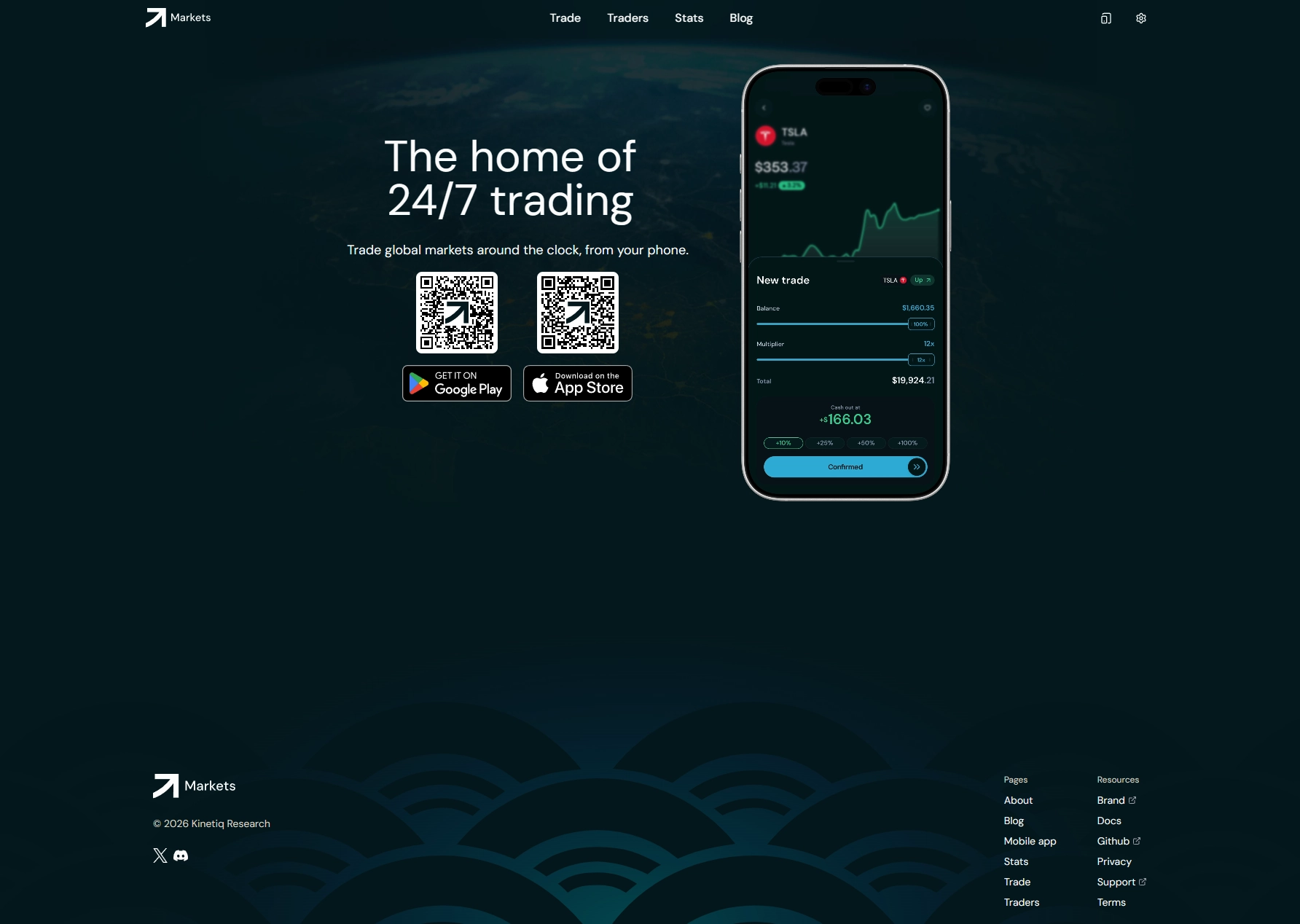


The mobile app also includes a social feed where you can see what other traders on the platform are doing, a leaderboard showing top-performing traders, and a copy trading feature that allows you to mirror trades from the leaderboard. For new traders who want to learn from experienced users while building their own skills, the mobile app's social features provide a useful learning layer on top of the core trading experience.
Common mistakes first-time decentralized traders make
Learning from other people's mistakes is significantly cheaper than making them yourself. Here are the most common errors new decentralized platform users make, and how to avoid them.
Using too much leverage too early
The most common account-destroying mistake. New traders see 50x leverage available and assume that means they should use it. Start at 1x to 3x. Learn how the platform behaves. Build a track record. Leverage up only after you've demonstrated you can trade profitably at lower levels.
Not setting a stop-loss
In a market that never closes, an unprotected leveraged position can move against you overnight, over the weekend, or during any off-hours event. Every leveraged position should have a stop-loss set at the time of entry, not added later when the trade is already moving against you.
Confusing the oracle price with the last trade price
On Markets.xyz, your PnL, margin, and liquidation price are all calculated against the mark price, which is based on the Kaiko oracle, not the last trade price. The last trade price can spike briefly on a single large order, which is why liquidations are triggered by the mark price rather than individual trades. Understanding this prevents confusion when you see a brief price spike that doesn't affect your position the way you expected.
Ignoring funding rates on long-duration positions
Funding rates are small on a per-hour basis but compound over time. A trader holding a long position in a heavily skewed market (where longs are paying shorts a high rate) can see meaningful capital eroded by funding costs over days or weeks. Always check the funding rate before holding a position for an extended period.
Approving transactions without reading them
In the Web3 ecosystem, your wallet approval is your signature on a legally and technically binding transaction. Get in the habit of reading every transaction your wallet asks you to approve. The few extra seconds it takes to review a transaction could prevent an accidental loss.
Storing seed phrases digitally
Screenshots, notes apps, emails, cloud storage. None of these are safe places for a seed phrase. Paper only. Physical storage only. Two copies in separate locations if the amount warrants it.
The decentralized market is open right now. No KYC. No custody risk. No closing time. Markets.xyz is ready when you are. Start trading on markets.xyz.
Frequently asked questions
Do I need any technical knowledge to use a decentralized trading platform?
Not beyond the basics covered in this guide. Setting up a Web3 wallet, connecting it to Markets.xyz, and placing trades is a straightforward process that takes under 10 minutes end to end. The trading interface is designed for active traders, not blockchain developers. If you can use a standard trading platform, you can use Markets.xyz. The main learning curve is understanding self-custody and wallet security, both of which are covered in this guide.
What happens to my funds if Markets.xyz shuts down?
Because Markets.xyz is non-custodial, your funds are in your own wallet at all times, not held by the platform. If Markets.xyz were to cease operations, your USDH balance would remain in your wallet, completely intact and accessible. This is one of the most significant structural advantages of decentralized trading over centralized platforms, where a platform shutdown or insolvency can leave users unable to access their funds for extended periods.
What is USDH and why is it used for margin?
USDH is a stablecoin pegged to the US dollar, used as the margin and settlement currency on Markets.xyz. Because it's stable, your margin value doesn't fluctuate with the crypto market while your position is open, giving you a predictable and reliable collateral base. All profits and losses are calculated and settled in USDH.
Can I trade traditional stocks and commodities on a decentralized platform?
Yes. Markets.xyz offers perpetual futures on individual equities (TSLA, NVDA, AAPL, GOOGL, and more), equity indices (US500, USTECH, SMALL2000), commodities (GOLD, SILVER, USOIL), and FX (EUR/USD), all available as 24/7 perpetual contracts. Prices are sourced from Kaiko's institutional-grade oracle, which uses the same pricing infrastructure as CBOE and Bitstamp by Robinhood.
Is there a minimum deposit to start trading on markets.xyz?
The minimum order size is 10 USDH, which means you can begin trading with a very small amount. There is no minimum account balance requirement. For beginners, starting with a small amount to learn the platform before scaling up is the recommended approach.
How do I withdraw my funds from Markets.xyz?
Click Withdraw in the platform interface and specify the amount of USDH you want to return to your wallet. Approve the transaction in your wallet app. The withdrawal processes near-instantly on Hyperliquid's network with a minimal network fee. No approval from Markets.xyz is required. You can withdraw at any time, including immediately after closing all positions.
What is the L4 orderbook and why does it matter?
The L4 orderbook is Markets.xyz's fully transparent on-chain orderbook that shows individual orders, queue priority, and liquidity attribution, not just aggregated price levels. Traditional platforms only show you the combined volume at each price level. The L4 orderbook shows you every individual order, who placed it, and where it sits in the queue. This level of market transparency gives retail traders the same informational access that was previously exclusive to institutional trading desks.
Is Markets.xyz available in my country?
Markets.xyz is accessible to traders in 180+ countries worldwide. The platform is not available to users in the USA, UK, or Ontario, Canada due to regulatory considerations. All other regions have full access to the complete platform with no product restrictions based on geography.
Conclusion
Decentralized trading is not a niche concept for blockchain enthusiasts anymore. It's a fully operational alternative to traditional centralized platforms, with real advantages in access, transparency, cost, and control that matter to any serious trader.
Understanding how it works, from seed phrases and smart contracts to oracle pricing and isolated margin, takes an afternoon to learn. The mechanics are genuinely straightforward once the concepts click. And the payoff is trading on your terms: 24/7, without a middleman, without custody risk, without artificial geographic limits, and at fees that are a fraction of what centralized platforms charge.
Markets.xyz is built on one of the most sophisticated decentralized infrastructures available in 2026. Hyperliquid's blockchain gives you near-instant settlement, a transparent L4 orderbook, and professional order types that most retail traders have never had access to before. Kaiko's oracle pricing ensures you're always trading on institutional-grade price data, even at 3 AM on a Sunday.
The market is open. Your wallet is the only key you need.
Start trading on the platform built for how the world actually works. Decentralized. Non-custodial. 24/7. Open to 180+ countries. No KYC, no closing time, no middleman. Start trading on markets.xyz.
Risk Disclaimer: Trading perpetual futures and other derivatives on decentralized platforms involves significant risk of loss. Leverage amplifies both gains and losses and can result in the total loss of your deposited margin. Self-custody means you are solely responsible for the security of your wallet and seed phrase. Past performance is not indicative of future results. This content is for informational purposes only and does not constitute financial advice. Always conduct your own research and consider your risk tolerance before trading. Markets.xyz is not available to users in the USA, UK, or Ontario, Canada.