

Learn about trading
Last updated
How to place an order
Placing orders on Markets is straightforward. This guide walks through the complete order placement process from selection to execution.
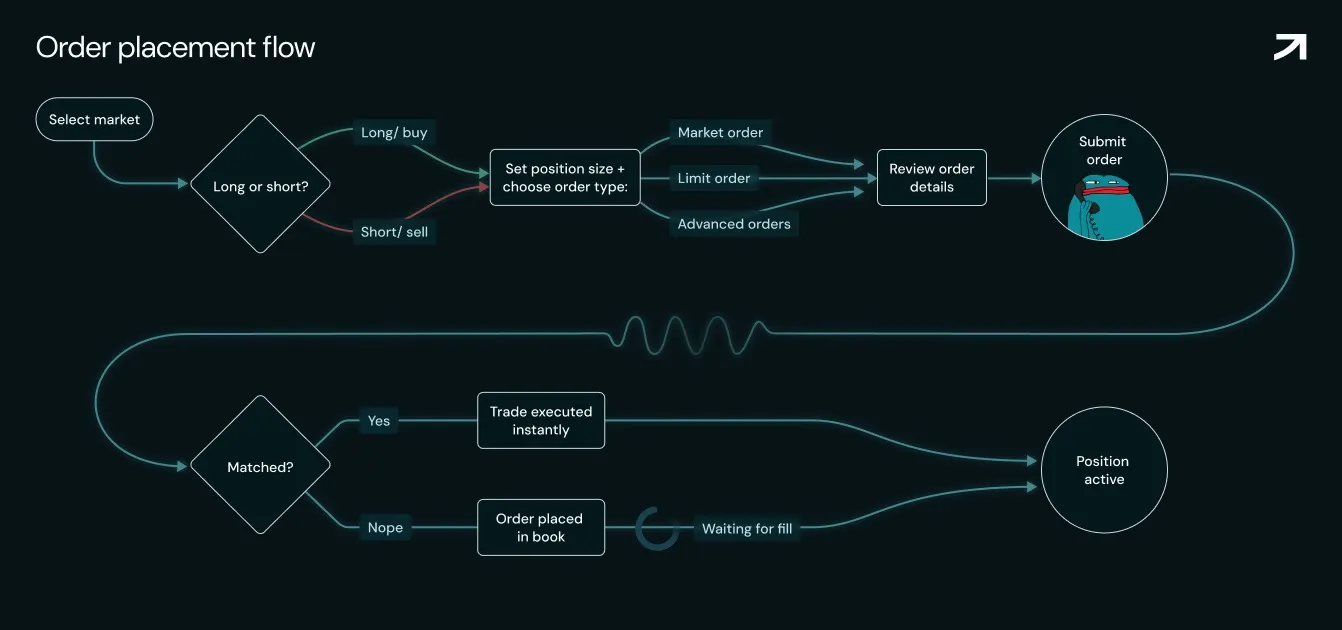
1. Select your market
- Use left sidebar to browse available markets
- Search by ticker symbol or name
- Click on desired market to load trading interface
- Verify you're on correct pair (check top of chart)
2. Choose order type
In the order entry panel (right side), select order type:
- Market - Execute immediately at current price
- Limit - Specify your price, wait for market to reach it
- Stop - Trigger order when price hits specified level
3. Select direction
- Long (Buy) - Profit when price goes up
- Short (Sell) - Profit when price goes down
4. Set position size
Enter the amount you want to trade:
- In USDC - Specify dollar amount (e.g., $1,000)
- In units - Specify quantity (e.g., 0.1 US500)
- Leverage adjusted - Platform shows actual exposure
Position sizing example: $1,000 USDC with 10× leverage means you can manage a position of up to $10,000
5. Set leverage
Adjust leverage slider from 1× to 50×.
⚠️ Leverage warning: Higher leverage amplifies both gains AND losses.
6. Set price (for limit orders)
If using limit order:
- Enter desired entry price
- Must be below current price for longs
- Must be above current price for shorts
- Platform shows % from current market price
7. Review order details
Before submitting, verify:
- Correct market/pair
- Correct direction (long/short)
- Position size as intended
- Leverage setting appropriate
- Price (for limit orders) makes sense
- Sufficient balance for margin requirement
8. Submit order
- Click "Buy/Long" or "Sell/Short" button
- Review confirmation modal showing:
- Entry price (market or limit)
- Position size and leverage
- Margin required
- Estimated liquidation price
- Fees
- Wait for confirmation (near-instant)
9. Monitor order
After submission:
- Market orders - Execute immediately, position appears in "Positions" tab
- Limit orders - Appear in "Open orders" tab until filled
- Partial fills - May execute in chunks as liquidity available
Modifying open orders
To edit a pending limit order:
- Go to "Open orders" tab (bottom panel)
- Click on order to edit
- Modify price or size
- Click "Update order"
- Confirm in wallet
Or use quick actions:
- Cancel - Remove order completely
- Replace - Cancel and create new order simultaneously
On this page